
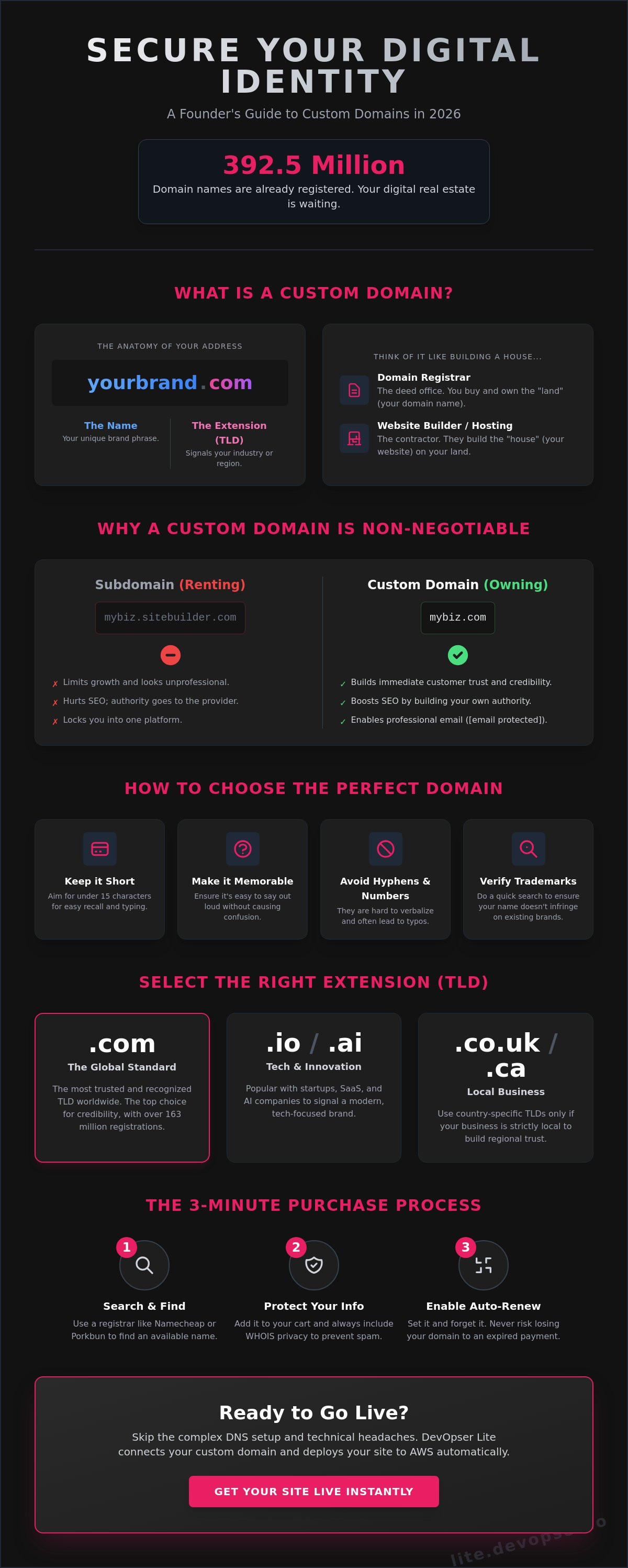
With 392.5 million domain names already registered as of early 2026, your digital real estate is disappearing fast. You know your brand needs a professional identity, but searching for how to get a custom domain for my website often leads to a wall of technical jargon and hidden fees. It’s frustrating to feel stuck between a generic URL and a complex DNS setup you didn't ask for. You want a .com or .io address that builds instant trust without the headache of manual configuration or the fear of overpaying for a name.
You’re right to want a faster way. This guide eliminates the confusion and shows you exactly how to find, buy, and link your domain in minutes. You will learn to navigate the registration process, understand the difference between hosting and domains, and complete your technical setup with zero stress. We provide a clear path to a professional web presence that works immediately. Follow these steps to secure your digital address and start building your credibility right now.
Key Takeaways
- Build immediate customer trust by establishing a unique digital identity for your brand.
- Discover how to get a custom domain for my website using AI tools for fast, memorable name generation.
- Master the technical setup by simplifying DNS settings and managing the site propagation window.
- Ensure long-term flexibility with pivot-friendly naming strategies and trademark verification.
- Deploy your site instantly with automated AWS integration and a transparent ownership model.
What is a custom domain and why is it essential for your business?
A custom domain is your digital home address. It replaces complex IP addresses with a human-readable name. When you look up What is a custom domain, you see it is the foundation of your online presence. It creates a permanent location for your brand that you control entirely. This ownership is the first step in building a professional reputation.
Every domain package includes three essential components:
- The Name: This is your specific brand word or phrase.
- The Extension: Known as a TLD. While .com remains the leader with over 163 million registrations, options like .io or .tech are popular for modern startups.
- The Registrar: This is the organization that handles the official registration and renewal of your name.
Founders often struggle with the distinction between a registrar and a website builder. Think of the registrar as the deed office for your land. The website builder is the contractor who builds the house. You can buy your name from one place and build your site at another. Understanding how to get a custom domain for my website starts with recognizing that owning the name gives you the freedom to move your site to any platform at any time. You aren't locked into one provider forever.
The difference between a domain and a subdomain
A subdomain is a prefix added to a provider's domain, such as mybusiness.sitebuilder.com. This setup limits your growth. It forces you to share brand space with your software provider. Professional domains like mybusiness.com provide full ownership of your digital assets. Subdomains hurt your search engine rankings because the authority is often attributed to the parent domain. Switch to a custom domain to ensure every visitor and every backlink builds your own authority, not someone else's. It's the difference between renting a room and owning the building.
Why professional domains drive higher conversion rates
Digital trust is harder to earn in 2026. A custom URL acts as a visual shorthand for legitimacy. It tells the visitor that you are a real business with a long-term plan. This professional image extends to your communication. Using a custom domain enables professional email addresses. Emails sent from name@yourbrand.com have higher deliverability rates than generic providers. They bypass spam filters more effectively and encourage higher open rates. A clean domain also allows for better SEO. It helps search engines categorize your content accurately, which is vital when you are learning how to get a custom domain for my website to attract more organic traffic. This clarity leads to higher quality leads and more sales.
How to choose and buy your perfect domain name
Pick a name that sticks. Your domain is the first thing people see, so make it count. Follow this checklist to ensure your choice works for your brand. Keep it under 15 characters. Avoid hyphens and numbers. Ensure it is easy to say out loud. Learning how to get a custom domain for my website starts with a smart, punchy name that requires no explanation. Avoid double letters like "pressset.com" because they lead to typos and lost traffic.
Use AI tools to accelerate your search. Enter your business niche and desired vibe into a name generator to see hundreds of variations instantly. Once you have a shortlist, check availability on reliable registrars like Namecheap, Porkbun, or Cloudflare. These platforms are known for transparent pricing and high reliability in 2026. If you want to skip the manual setup, you can connect your custom domain automatically using modern automation tools that handle the configuration for you.
Selecting the right domain extension (.com vs .ai vs .io)
The extension is your Top-Level Domain (TLD). It signals your industry to the world. .com remains the global standard for trust and authority. Tech startups and software companies often prefer .io or .ai to signal innovation. Use regional extensions like .co.uk or .ca only if your business is strictly local. Choosing a TLD that matches your category helps search engines index your site more effectively. It also sets clear expectations for your visitors before they even click your link.
The 3-minute purchase process
Move fast once you find a name you like. Type the name into your chosen registrar's search bar. Add it to your cart immediately. Always include WHOIS privacy protection during checkout. This service hides your personal contact details from public databases and prevents a flood of marketing spam. The Domain Name System (DNS) handles the technical routing, but your journey starts with this simple purchase.
Enable auto-renewal before you finish. Thousands of founders lose their domains every year because they forget to renew them manually. Setting up auto-pay ensures your digital identity stays safe without any ongoing effort. Once you decide how to get a custom domain for my website, the actual checkout takes less than three minutes. Secure your name now so you can focus on building your actual business.
Connecting your domain to your website: DNS explained
DNS stands for Domain Name System. It acts as the phonebook of the internet. Computers communicate using IP addresses, which are long strings of numbers. Your domain name translates these numbers into a brand name humans can remember. Think of your domain as the sign hanging above a store. The hosting is the actual building where your website files live. You must tell the sign which building to point toward so visitors can find you. This connection is the final step in how to get a custom domain for my website.
You will manage your connection through three primary record types in your registrar's dashboard:
- A Record: Points your domain to a specific numeric IP address.
- CNAME: Creates an alias. Use this to point the "www" version of your site to your root domain.
- TXT: Stores text-based information. This is used to verify ownership for search engines and secure email services.
Don't panic if your site isn't live the second you hit save. DNS propagation is the time it takes for servers across the globe to update their records with your new information. While this can take up to 48 hours, most modern systems finish the job in under an hour. You can use free online DNS checkers to track the progress of your site as it goes live in different regions.
Understanding A Records and CNAMEs
An A Record is your primary link to the server hardware. It tells the internet exactly where your site files sit. A CNAME functions as a nickname for your domain. It allows different versions of your URL to lead to the same destination. DNS propagation is the global synchronization period where every server learns your new address. It's an automated process that requires no action from you once the records are set.
Common mistakes when linking your domain
Avoid the double hosting trap. Many registrars will try to sell you hosting during the checkout process. If you've already built your site elsewhere, you don't need this extra service. You're only there for the name. Paying for both is a waste of your budget.
SSL certificates are mandatory for every custom domain in 2026. Without one, browsers will flag your site as "Not Secure," which kills your credibility instantly. Most modern website builders provide this automatically. Finally, verify your ownership immediately. Add a TXT record to your DNS settings to link your site with search consoles. Completing this step is a vital part of how to get a custom domain for my website because it unlocks your site analytics and professional email capabilities.
Choosing a name that scales: Best practices for founders
Select a name that grows with your vision. Many founders make the mistake of being too specific early on. If you name your business "SeattleWebDesign.com," you create a geographic barrier for future growth. Choose a broad, brandable name that allows you to pivot your services or location without losing your digital identity. Planning how to get a custom domain for my website requires thinking five years ahead. Your name is the only part of your technical stack that is truly difficult to change later.
Apply the radio test to every shortlist candidate. Say the name out loud. If people ask "Is that with a K or a C?" or "Does that have a hyphen?", keep looking. Your domain must be instantly spellable. Verify your chosen name across all major social media platforms before you buy. Consistent handles across X, Instagram, and LinkedIn reinforce your brand authority and prevent impersonation. Finally, perform a trademark search. Buying a domain that infringes on an existing business leads to forced takedowns and legal fees that far exceed the cost of the registration.
The 2026 trend: Micro-branding and specific landing pages
Smart founders in 2026 are moving toward micro-branding. Instead of one massive site, they buy specific domains for individual offers or seasonal campaigns. This strategy allows for hyper-targeted SEO and cleaner marketing. You can manage these multiple addresses easily by using 301 redirects to point them toward your primary site. This approach captures keyword-rich traffic while keeping your main brand name clean and professional. It lets you test new markets without committing to a full rebrand or complex site architecture.
Avoiding the "Technical Debt" of bad naming
Changing your domain after you have launched is an SEO catastrophe. You lose the authority and backlinks you have spent months building. This is the ultimate form of technical debt. Check the history of any domain before you buy it. Use historical archives to ensure the name wasn't previously used for spam or low-quality content. A "dirty" domain history can suppress your search rankings from day one. Avoid buying from squatters who charge thousands for names that offer little actual value. Focus on a fresh, clean start. Launch your site with a scalable name by using DevOpser Lite for instant deployment.
Get your website and custom domain live with DevOpser Lite
Manual DNS configuration is the primary reason most founders never launch. You shouldn't have to learn server administration just to share your business with the world. DevOpser Lite removes this barrier with automated AWS-powered domain integration. It handles the backend heavy lifting so you can focus on your brand. This system replaces hours of technical study with a streamlined process that takes less than 20 minutes. You get a professional presence without the traditional friction of how to get a custom domain for my website.
Ownership models are changing in 2026. Most builders trap you in a cycle of monthly hosting fees just to keep your domain connected. DevOpser Lite prioritizes your independence with a pay-once ownership model. You own your digital assets. The platform automatically configures your SSL certificate and enterprise-grade hosting the moment you connect. There are no plugins to install and no security settings to toggle. Everything is live and secure from the start.
The 90-second launch workflow
Efficiency is the core of this platform. Start by inputting your business description into the AI builder. The system generates your site structure instantly. Next, select your custom domain directly within the dashboard. You don't need to leave the interface to manage external settings. Click "Launch" to finalize the process. The AI manages the entire DNS and AWS configuration in the background. You receive real-time status updates as your site moves from a draft to a global URL. This is the fastest method for how to get a custom domain for my website while maintaining total control.
Why AWS infrastructure matters for your domain
Your domain is only as reliable as the servers behind it. DevOpser Lite uses enterprise-grade AWS infrastructure to ensure your site stays online and loads fast. High-speed performance is standard, not an upgrade. Automated backups and security protocols run constantly to protect your data. You get the same level of reliability used by global corporations without the need for a dedicated IT team. This stability builds trust with your visitors and improves your search engine performance. Launch your business with a custom domain on DevOpser Lite to secure a professional, high-performance home for your brand today.
Build your professional presence today
Your custom domain is the most valuable asset in your digital stack. It creates instant trust and ensures you own your brand's future. You now have the checklist to choose a scalable name and the technical knowledge to handle DNS settings without fear. Understanding how to get a custom domain for my website is the first step. The next step is making it live.
Don't let technical hurdles delay your launch. You can bypass manual configuration and expensive monthly subscriptions. Use a system that prioritizes speed and permanent ownership. Secure a foundation built on enterprise-grade AWS infrastructure that remains stable as you grow. It's time to turn your vision into a professional reality.
Launch your website and integrate your domain in 90 seconds. Benefit from AI-powered landing page generation and total AWS-backed reliability. Switch to a one-time payment ownership model and take full control of your online identity. Your site is ready to go live. Start now.
Frequently Asked Questions
How much does a custom domain typically cost in 2026?
Expect to pay between $7.79 and $17.79 for a standard .com domain for the first year. Renewal prices are generally higher, ranging from $9.69 to $19.99 annually. Premium extensions like .io or .tech can cost up to $41.27, while budget TLDs like .site or .online often start as low as $1.00 for the initial registration period.
Can I get a custom domain for free?
Most professional domains require a registration fee and a mandatory $0.20 ICANN transaction fee. You might receive a free domain as a promotional bonus when purchasing a yearly hosting plan from specific providers. Avoid free subdomains if you want to maintain full ownership and professional credibility for your brand.
How long does it take for my new domain to start working?
Most domains start working within an hour of registration. The technical process of updating global servers, known as propagation, can take up to 48 hours to complete worldwide. You can monitor this progress using free online DNS lookup tools to see when your site becomes visible in different regions.
Do I need to buy hosting separately from my domain name?
Yes, you need both a domain name and a hosting service to make your website live. The domain is your address, while hosting is the digital space where your files are stored. Modern platforms like DevOpser Lite combine these steps by providing automated integration and enterprise-grade hosting in one streamlined workflow.
Can I change my website domain name after I have bought it?
You cannot edit a domain name once the registration is processed. If you want a different name, you must purchase a new one. To keep your current traffic, you should set up a 301 redirect from your old domain to the new one. This ensures visitors and search engines find your new location without losing authority.
What is the difference between a registrar and a website builder?
A registrar is a company authorized to sell and manage domain name registrations. A website builder provides the interface and tools you use to design your actual web pages. Many founders look for how to get a custom domain for my website through platforms that act as both to eliminate the need for manual technical configuration.
What happens if I forget to renew my domain name?
Your domain will enter a 30-day grace period where you can still renew it at the standard rate. If you miss this window, it enters a 30-day redemption period with significantly higher recovery fees. After these 60 days, the domain is released to the public and can be purchased by anyone else on the open market.
Do I need an SSL certificate for my custom domain?
Yes, an SSL certificate is mandatory for all websites in 2026. It encrypts the connection between your server and your visitors, which is essential for security and search engine rankings. This is a vital requirement when learning how to get a custom domain for my website because browsers will block access to sites that lack a valid certificate.